How to Cancel Surfer SEO: The Exact Steps, What Happens to Your Access and the Refund Rules in Its Regulations
Short answer: according to Surfer's help article (dated 12 November 2026), log in, open the profile dropdown in the top right, choose Settings, go to Billing and then Your subscription, click Cancel subscription in the bottom right of that section and confirm in the pop-up. Your account then stops renewing automatically and you can use all the tools until the end of the billing cycle you already paid for. Surfer's Regulations say a monthly fee is collected for the month in which you cancel, and that a prepaid annual fee is not refundable, although you can ask support to recalculate it. Everything below was read from surfer.ai and docs.surferseo.com on 14 November 2026.
A note on the address: surferseo.com/pricing now redirects to surfer.ai/pricing, and the legal pages we found are at surfer.ai/legal. If an old link takes you somewhere unexpected, that is why.
What Surfer's own pages say about cancelling
| Question | What is written | Where |
|---|---|---|
| How do I cancel? | Settings, then Billing, then Your subscription, then Cancel subscription, then confirm | Help article, 'How can I cancel my subscription' |
| Do I keep access? | Yes, until the end of the current billing cycle (month or year) | Help article and pricing FAQ |
| Can I pause instead? | No. The only way to stop a renewal is to cancel | Help article |
| Who sees the billing page? | Admins and owners of the account | Help article, troubleshooting section |
| Refund on a monthly plan? | The fee is collected for the billing month in which you unsubscribe | Regulations, section 3 item 11 |
| Refund on an annual plan? | Not refundable, but you may ask support to recalculate it proportionally | Regulations, section 3 item 11 |
| Consumer withdrawal? | 14 days from concluding the contract, with an exception for services already started | Regulations, section 7 |
| Free trial? | Not found. The buttons read 'Start for Free' and lead to checkout | Pricing page |
How to cancel Surfer SEO, step by step
The help article gives three steps. We quote its wording, and since we cannot see your account, check each against the live screen:
- Open Settings. 'Log in to your account, expand the profile drop-down at the top-right corner of the app, and select Settings.'
- Go to Billing, then Your subscription. The Cancel subscription option is in the bottom right corner of that section.
- Confirm. You are asked to confirm the cancellation in a pop-up window.
The article says that afterwards your account will no longer renew automatically and you can use all the tools until the end of your current billing cycle. It also says you cannot pause a Surfer subscription: the only way to stop a renewal is to cancel entirely.
If you cannot see the Billing option, the troubleshooting section says it is visible to admins and owners only, so ask the person who set up the account. If you are the owner and still cannot find it, the Regulations (section 3 item 11) say you may also send the cancellation by post or to support@surferseo.com.
What happens to your access after you cancel
Surfer's pricing FAQ says: 'You'll have access to the app until the end of the already-paid billing period, regardless of the exact date you cancel.' The Regulations say the same for monthly plans: if you resign mid-month, the subscription is not renewed for the next month and you can use the functions until the end of the month you paid for.
Two practical consequences follow. First, cancelling early costs you nothing in access, so cancel as soon as you have decided rather than waiting for the last day. Second, the credits that came with the plan are tied to it: the pricing FAQ says credits reset yearly or after you change your plan, and the cancel article says that if you come back later you can choose only from the plans available at that time, at their current prices.
Refunds: monthly, annual and the 14-day right
Surfer has no stated money-back guarantee on the pages we read. Its refund rules are in the Regulations, section 3 item 11:
- Monthly plans. If you unsubscribe during the billing month, the service fee is collected for that billing month. In plain terms, you pay for the month you are in and nothing further.
- Annual plans. If you cancel a prepaid annual subscription, the fee is not refundable. The same clause lets you ask support to recalculate the fee proportionally to the higher of the billing months already begun and the share of your usage limits consumed. If support accepts, the difference is refunded. No time limit is given for that request, so ask promptly and in writing.
The Regulations also contain the statutory consumer right. Section 7 says a consumer may withdraw from a distance contract without giving a reason within 14 days of concluding the contract for services supplied by electronic means. The same section lists an exception where the consumer agreed that the service should start and acknowledged losing the withdrawal right, so whether it applies to you depends on what you accepted at checkout. This is how the Regulations describe it; if the rule matters to your case, read the section yourself or ask a qualified adviser. This is not legal advice.
The pricing FAQ adds a billing detail: yearly plans are charged for the entire year at purchase, and Surfer accepts credit and debit cards for monthly and yearly plans and bank transfers for yearly plans only.
What to put in a cancellation or recalculation email
- Account email and the domain or workspace the plan is for.
- Plan name and billing period.
- Date and amount of your payment.
- A clear instruction: 'Please cancel my subscription and confirm the date it ends.' For an annual plan, add: 'I also ask you to recalculate the fee under section 3 item 11 of the Regulations and refund any difference.'
- A request for written confirmation.
Keep it short and factual, and keep the reply. If a charge appears later, the dated email is the first thing you will want to show.
What you are paying for
The pricing page, read on 14 November 2026 at surfer.ai/pricing, shows prices in euros per month, billed yearly: AI Search Analytics at 82 EUR, Discovery at 49 EUR, Standard at 99 EUR, Pro at 182 EUR, Peace of Mind at 299 EUR and a custom Enterprise plan. Discovery lists creating or optimizing 120 documents and tracking 10 pages; Standard lists 360 documents and tracking 25 AI prompts weekly; Pro and AI Search Analytics list 50 AI prompts tracked daily; Peace of Mind lists 100 prompts and unlimited documents under a fair-usage policy. The page does not show a separate monthly-billing price, so we cannot tell you what the monthly price is.
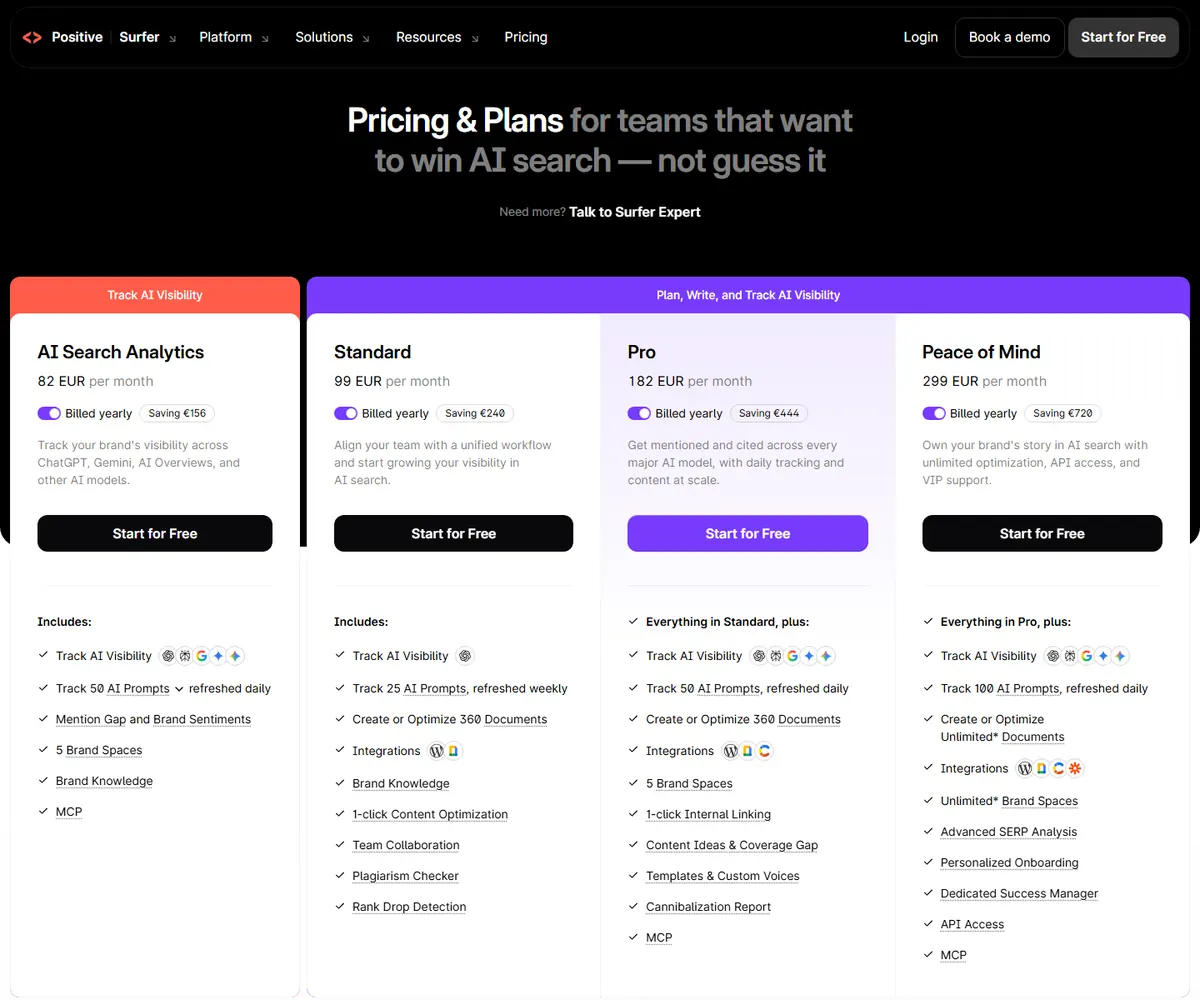 Screenshot of Surfer's pricing page, taken on 15 November 2026 in a desktop browser. Prices shown in euros, billed yearly. Image property of Surfer, reproduced for review purposes.
Surfer calls its limits documents, not articles, and many of them are optimizations of existing pages, so the numbers are not comparable to a tool that writes and publishes new articles.
Before you leave: keep what you need
- Export your content and guidelines. Save the briefs, optimization guidelines and any documents you still need before your access ends.
- Note which pages you were tracking and which AI prompts, because tracking stops with the plan.
- Check the date on the confirmation. Take a screenshot of the final screen and keep the email.
- Check your statement after the end date.
If you are cancelling a different tool, our guides on how to cancel TrySoro and how to cancel Outrank use the same method. For a full comparison of the two products, see Surfer SEO vs Rocketito.
Why people search for this
When we checked Google's autocomplete on 12 November 2026, it suggested 'how to cancel' for Surfer SEO, so there is demand for the answer. We cannot see why any one person leaves. A common reason across subscription tools is that the product does one job well, such as optimizing existing pages, while the buyer's bigger problem is producing and publishing new content every week.
Switching from Surfer: how Rocketito compares
Rocketito competes with Surfer, so weigh this section accordingly. The two do different jobs: Surfer helps you optimize and research content and track AI prompts, and Rocketito writes new SEO articles and publishes them to your website automatically.
| Surfer (pricing page, 14 Nov 2026) | Rocketito | |
|---|---|---|
| How to cancel | Settings, Billing, Your subscription, Cancel subscription | Billing section of the dashboard, or email support@rocketito.com |
| Refund | Monthly: fee collected for the month. Annual: not refundable, recalculation on request. 14-day consumer right per the Regulations | No refunds. 3-day free trial with a card; 90-day guarantee adds 1 extra year free |
| Entry plan | Discovery: 49 EUR a month, billed yearly | Essential: $47 a month billed yearly ($564), $79 monthly |
| What the entry plan gives | Create or optimize 120 documents, track 10 pages | 62 articles written and published a month on yearly, 31 on monthly |
| Currency | Euros | US dollars |
The honest read: if you want a tool to optimize pages you already have and to track AI prompts, Surfer's plans are built for that and Rocketito's are not. If you want new articles researched, written and published without doing the work yourself, that is what Rocketito does. They are not like for like, and prices in euros and dollars are not directly comparable.
Rocketito's terms, stated plainly because unclear terms are what many cancellation searches are about: a 3-day free trial with a card, cancel from the billing section of your dashboard (Manage Billing, then Cancel subscription) or by emailing support@rocketito.com, and no refunds for charges already made. The one exception is our 90-day guarantee, which adds one extra free year, not money back, if your organic traffic does not grow and the conditions in our refund policy are met.
Publish SEO articles on autopilot Rocketito writes and publishes 31 SEO articles a month to your website. 3-day free trial, cancel anytime. Start for Free
Frequently Asked Questions
How do I cancel Surfer SEO?
According to its help article, open Settings from the profile dropdown, go to Billing, then Your subscription, click Cancel subscription and confirm in the pop-up.
Can I pause my Surfer subscription instead?
The help article says no: you cannot pause, and the only way to stop a renewal is to cancel.
Do I keep access after I cancel?
Yes, until the end of the billing period you already paid for, according to the help article and the pricing FAQ.
Can I get a refund from Surfer?
Its Regulations say a monthly fee is collected for the month in which you unsubscribe and a prepaid annual fee is not refundable, although you can ask support to recalculate it. They also describe a 14-day withdrawal right for consumers, with an exception for services already started.
Does Surfer have a free trial?
We did not find one. The pricing buttons read 'Start for Free' and lead to checkout, and a free account exists but does not include all features.
I cannot find the Billing page. Why?
The help article says it is visible to admins and owners only. Ask the person who created the account, or write to support@surferseo.com.
How do I cancel Rocketito?
From the billing section of your dashboard, or by emailing support@rocketito.com. Rocketito does not issue refunds for charges already made.
*Surfer facts come from surfer.ai (pricing page and Regulations) and docs.surferseo.com (the cancellation help article dated 12 November 2026), read on 14 November 2026, and can change; check the live pages before you act. We did not find a Terms of Service page. This is general information, not legal advice. Rocketito competes with Surfer.*