How to Cancel Semrush: The Cancellation Form, the 24-Hour Confirmation Link, the 7-Day Refund Rule and What You Keep
Short answer: according to Semrush's own help article, you cancel by logging in and submitting the Cancellation Form at semrush.com/cancel (or from Subscription Info, through the Contact us link next to Recurring: Active). Then you have 24 hours to click the link in the confirmation email. If you do not, the article says the request will not be processed and billing will continue. A 7-day money-back guarantee exists, but only for initial subscriptions with a term of twelve months or more and for initial add-on purchases, not for month-to-month plans. Everything below was read from semrush.com on 15 November 2026.
What Semrush's own pages say about cancelling
| Question | What is written | Where |
|---|---|---|
| How do I cancel? | Submit the Cancellation Form, choose the toolkit or all subscriptions, answer the questions | Help article 'Canceling Your Semrush Account' |
| Is it instant? | No. You must click the confirmation email link within 24 hours, then Support creates a case and emails when it is done | Same article |
| Is there a refund? | One-time 7-day money-back guarantee, for initial annual (12 months or more) subscriptions and initial add-ons only | Cancellation and Refund Policy, last updated 20 August 2025 |
| Month-to-month plans? | Refunds are not available | Same policy |
| Trial? | If you do not cancel before it ends, it converts to a paid subscription | Same policy |
| After cancelling? | You keep a free-level account; some data is kept for a 30-day grace period | Help article |
| Can I delete the account? | Yes, by request; the link is valid 72 hours and deletion follows within 30 days | Help article |
The help article itself shows no page date, so we cannot tell you when its wording last changed. The refund policy is dated, and we mark each fact with the page it came from. Semrush can change any of this, so check the live pages before you act.
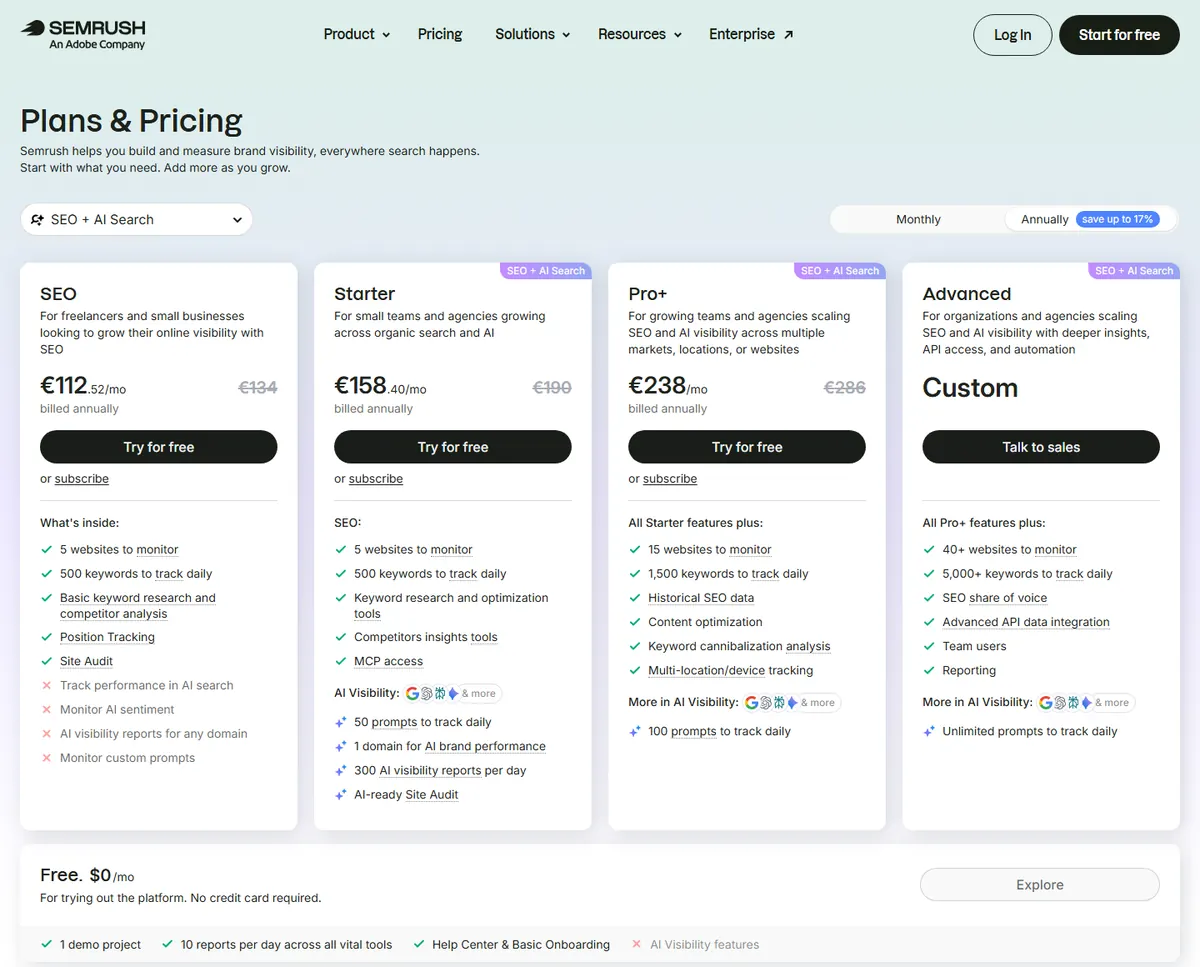 Screenshot of semrush.com/prices, taken on 15 November 2026 in a desktop browser. Prices shown in euros; the page opened on annual billing. Image property of Semrush, reproduced for review purposes.
The screenshot matters for cancelling because of one detail: the page opens on annual billing, with a badge saying save up to 17 percent. If you chose annually, the 7-day money-back guarantee below is the only refund route, so check which billing period you are on in Subscription Info before you do anything else.
How to cancel Semrush, step by step
These are the steps in the help article. We have not run them on a live account, so check each one against the screen you see:
- Log in to the Semrush account that holds the subscription. Using a different account is the most common reason a cancellation seems to do nothing.
- Open the Cancellation Form. Go to semrush.com/cancel, or open Subscription Info, find the line that says Recurring: Active and follow the Contact us link to the same form.
- Choose what to cancel. Pick a single Toolkit, or choose All Semrush subscriptions to cancel the whole paid subscription, including add-ons and apps.
- Answer every question. The refund policy page warns that unanswered questions can lead to the request being denied, so do not skip fields.
- Click the link in the confirmation email within 24 hours. This is the step people miss. The article says that if it is not confirmed in 24 hours, it will not be processed and billing will continue.
- Wait for the completion email. Support creates a case and sends a confirmation when the cancellation is complete.
- Verify. Subscription Info should now read Recurring: Inactive. If it still says Recurring: Active, the plan is still set to renew.
If you cannot log in, the article tells you to contact Support with the account email, the last four digits of the card and the amount and date of the last payment. It specifically says not to send a full card number, and neither should you.
A message you can copy for the comments field
The cancellation form has a comments field, and that is where the refund policy says to ask for a refund. Keep it short and factual. Adapt the brackets:
Subject or first line: Cancellation of all Semrush subscriptions, refund request within 7 days
Message: Please cancel [Toolkit name or all Semrush subscriptions] on the account [your account email]. My plan is [annual or monthly] and was first ordered on [date], so this request is inside the 7 calendar days of the initial order. Please process the refund to the original payment method of [amount and currency], and confirm the date the cancellation takes effect. I will confirm the cancellation email within 24 hours.
If you are outside the 7 days, or on a monthly plan, delete the refund sentences and keep the first two. Save the text, a screenshot of the form after you submit it and the confirmation email.
The 24-hour confirmation link is where cancellations fail
Most guides skip this, but it matters more than the form. Semrush's process has two halves: you submit the request, and then you confirm it by email. The article is explicit that an unconfirmed request is not processed. If the email lands in spam, or you submit the form late in the evening and forget, the subscription keeps renewing.
Practical steps that cost nothing:
- Submit the form when you can watch your inbox for the next few minutes, not at the end of a long day.
- Search your inbox and your spam folder for the confirmation message straight away.
- Take a screenshot of the form submission and of the confirmation, and save the completion email when it arrives.
- Check Subscription Info a day later for Recurring: Inactive.
- Check your card statement after the next renewal date to confirm nothing was charged.
Who gets a refund, and who does not
The Cancellation and Refund Policy (last updated 20 August 2025) applies to online purchases made on semrush.com by credit card. Customers on a signed agreement, such as an Order Form, Enterprise terms or an MSA, are governed by those terms instead. For everyone else, the policy describes a one-time, 7-day money-back guarantee with two limits:
- It covers initial subscriptions with a term of twelve months or more, and initial add-on purchases.
- It does not cover month-to-month subscriptions. The policy says refunds are not available for them.
- It must be requested in writing within 7 calendar days of the initial annual subscription order or the initial add-on order.
- Refunds are processed within 30 calendar days of the request, to the original payment method, and bank or currency fees are borne by the customer.
- Cancelling does not refund you by itself. To ask for a refund you say so in the comments field of the cancellation form, or use the support contact form.
The help article adds three details. Toolkits count as standalone subscriptions rather than add-ons. Renewal charges are not eligible. And trials that convert into standalone monthly products are not eligible for the 7-day guarantee. In plain terms: if you took a trial, let it convert into a monthly plan and then changed your mind, the guarantee does not apply. If you bought an annual plan last week by mistake, it probably does, but only if you ask inside the window.
What happens when the cancellation takes effect
The refund policy says cancellation takes effect at the end of your committed subscription term, and that cancelling does not release you from binding payment obligations unless the Terms of Service allow it. It also says that cancelling mid-term does not refund prepaid amounts without a valid refund request, and that to prevent future renewal charges you must cancel before your next renewal. The practical reading is simple: cancel before the renewal date, not on it.
After cancelling you keep a free-level account. The help article says Website Monitoring projects above the free limit are locked but still listed, and that their data is kept for a 30-day grace period if you restore the paid SEO Toolkit within 30 days. Otherwise it is deleted, except the Website Monitoring data in your oldest project. If you downgrade instead of cancelling, contact Support; the article says data is kept for one month on a free plan, with the same oldest-project exception.
If you also want the account deleted, the article says to request it through the support form. A confirmation link is valid for 72 hours, and the account is permanently deleted within 30 days after you confirm, subject to legal retention obligations.
Cancelling a trial, an add-on or an app
The three cases follow different routes:
- Trial. The policy says that if you do not cancel before it ends, it converts to a paid subscription. Semrush advertises a 7-day free trial on its pricing pages. Put the end date in your calendar the day you start.
- Add-ons and limits. Use the support form rather than the Cancellation Form. Add-ons that were active when you upgraded carry over and are billed on the new cycle.
- Apps. Open the My Apps page, go to Settings and choose Cancel trial or Cancel app subscription. For app cancellations the article lists app-center@semrush.com when prompted.
What you are paying for today
The pricing page we read on 15 November 2026 displayed prices in euros, so the figures below are in euros as shown to us. Semrush can show different currencies and amounts by region, so your own page may differ:
| Plan (SEO + AI Search tab) | Price shown | Notes |
|---|---|---|
| SEO | 112.52 a month, billed annually | Instead of 134 monthly |
| Starter | 158.40 a month, billed annually | Instead of 190 monthly |
| Pro+ | 238 a month, billed annually | Instead of 286 monthly |
| Advanced | Custom | Talk to sales |
| AI Visibility Toolkit | 94.94 a month per domain, billed annually | Separate pricing page |
| Free | 0 | No credit card required |
Two things worth noticing. The older plan names Pro, Guru and Business no longer appear on the pricing pages we read; the help article calls them legacy subscriptions, so if you still pay for one, your plan may not match what is sold today. And the page says you save up to 17 percent by paying annually, which is exactly the situation where the 12-month refund rule and the renewal date matter most.
Before you leave: keep what you need
- Export your reports and keyword lists. Download position tracking history, site audit reports and keyword research you rely on before the plan ends.
- Note your projects. Write down the domains and settings you tracked, because limits drop to the free level.
- Check API or integration use. If a dashboard, script or agency report pulls from Semrush, switch it off before the plan lapses.
- Look at downgrading first. If you only use one toolkit, an add-on or a smaller plan may cost less than leaving.
- Mark the renewal date and verify the cancellation on your next statement.
If you are cancelling a different tool, our guides on how to cancel Surfer SEO, how to cancel Writesonic and how to cancel TrySoro follow the same method. If you are weighing a switch, see our Semrush alternative for AI SEO guide and the Semrush vs Rocketito comparison.
Why people leave Semrush
When we checked Google's autocomplete on 15 November 2026, it suggested 'how to cancel' for the name Semrush, so people do search for this. We cannot see why any individual leaves. The usual reasons for dropping a large SEO toolkit are cost against actual use, needing only one feature, or moving to a tool built for a different job. Whatever your reason, the practical advice is the same: keep proof of what you cancelled and when, and confirm the end of billing yourself instead of assuming it.
Switching from Semrush: how Rocketito compares
Rocketito competes with Semrush for some budgets, so weigh this section accordingly. They do different jobs. Semrush is a research and tracking toolkit: keyword data, audits, position tracking. Rocketito writes and publishes SEO articles to your website automatically. If you used Semrush mainly to find topics and then wrote the content yourself, Rocketito covers the writing and publishing part; if you rely on Semrush's data tools, it does not replace them.
| Semrush (pages read 15 Nov 2026) | Rocketito | |
|---|---|---|
| How to cancel | Cancellation Form, then confirm by email within 24 hours | Billing section of the dashboard, or email support@rocketito.com |
| Refund | 7 days, annual and initial add-ons only; none for monthly | No refunds. 3-day free trial with a card; 90-day guarantee adds 1 extra year free |
| What it is | Research, audit and tracking toolkit | Writes and publishes SEO articles to your site |
| Entry price | SEO plan shown at 112.52 a month billed annually | Essential: $47 a month billed yearly ($564), $79 monthly |
| Articles a month | Not the product's job | 62 on yearly, 31 on monthly |
Rocketito's terms, stated plainly because unclear terms are what many cancellation searches are about: a 3-day free trial with a card, cancel from the billing section of your dashboard (Manage Billing, then Cancel subscription) or by emailing support@rocketito.com, and no refunds for charges already made. The one exception is our 90-day guarantee, which adds one extra free year, not money back, if your organic traffic does not grow and the conditions in our refund policy are met.
Publish SEO articles on autopilot Rocketito writes and publishes 31 SEO articles a month to your website. 3-day free trial, cancel anytime. Start for Free
Frequently Asked Questions
How do I cancel Semrush?
According to its help article, log in, submit the Cancellation Form at semrush.com/cancel, choose the toolkit or all subscriptions, answer the questions and click the link in the confirmation email within 24 hours. Then check that Subscription Info shows Recurring: Inactive.
Is there a Cancel button inside Semrush?
The article describes a form reached from Subscription Info or from semrush.com/cancel, not a one-click button. The cancellation is not final until you confirm by email.
What happens if I do not click the confirmation email?
The article says that if it is not confirmed in 24 hours it will not be processed and billing will continue.
Can I get a refund from Semrush?
Only inside the 7-day guarantee: initial subscriptions with a term of twelve months or more and initial add-ons, requested in writing within 7 calendar days. Month-to-month subscriptions and renewals are not eligible.
Will I lose my data when I cancel?
You keep a free-level account. Locked Website Monitoring projects keep their data for 30 days if you restore the paid plan, then it is deleted, except the oldest project's Website Monitoring data.
Does cancelling stop the charge immediately?
The refund policy says cancellation takes effect at the end of your committed term, and that you should cancel before your next renewal to avoid another charge.
Can I cancel a free trial?
Yes. The policy says an uncancelled trial converts to a paid subscription, so cancel before it ends.
How do I cancel Rocketito?
From the billing section of your dashboard, or by emailing support@rocketito.com. Rocketito does not issue refunds for charges already made.
*Semrush facts come from semrush.com (help article 'Canceling Your Semrush Account', Cancellation and Refund Policy last updated 20 August 2025, pricing pages), read on 15 November 2026, and can change; check the live pages before you act. We did not read the Terms of Service or the collapsed pricing FAQ answers. This is general information, not legal advice. Rocketito competes with Semrush for some budgets.*